
What Is a Project Risk Register?
A project risk register — sometimes called a risk log — is a centralized document that captures all identified risks for a project, along with the information the team needs to manage them: how likely each risk is, how damaging it would be if it materialized, who owns it, and what the response plan is.
A project risk register is a structured record of identified project risks, their likelihood and impact ratings, assigned owners, and planned responses. It is the primary tool teams use to track, communicate, and manage known risks throughout the project lifecycle.
Every major project management framework treats the risk register as foundational. The PMBOK Guide (Project Management Body of Knowledge) describes it as a key output of the Identify Risks process. PRINCE2 builds it into its Risk Management Approach. The PMO Standard references it as a core governance artifact.
In practice, risk registers live in whatever format the team can actually maintain: a spreadsheet in Excel or Google Sheets, a dedicated section inside Jira, Asana, Monday.com, or Microsoft Project, or a standalone risk management platform. Format matters less than consistency of use.
What to Include in a Project Risk Register
A complete risk register captures enough information to identify the risk, prioritize it against others, assign clear ownership, and track whether the response is working. The core fields:
| Field | What It Captures | Example |
|---|---|---|
| Risk ID | Unique identifier for tracking and referencing | R-014 |
| Risk Description | Clear statement of what could go wrong and why | "Vendor X may not deliver API integration by Week 8, delaying UAT start" |
| Category | Risk type for filtering and reporting | Vendor / Schedule / Budget / Resource / Compliance / Technical |
| Likelihood | Probability of occurrence (1–5 scale or Low/Med/High) | High (4/5) |
| Impact | Potential damage to schedule, cost, or scope if it occurs | High — 3-week delay, $80K cost increase |
| Risk Score | Likelihood × Impact — used to prioritize the register | 16/25 |
| Risk Owner | Person accountable for monitoring and response | Sarah T. (Vendor Manager) |
| Response Strategy | How the team will address the risk: Accept, Mitigate, Transfer, or Avoid | Mitigate — weekly check-ins with vendor; parallel internal development |
| Status | Current state of the risk and response | Active / Monitoring / Closed / Escalated |
| Trigger Conditions | Observable signals that indicate the risk is materializing | "Vendor misses 2 consecutive weekly check-in milestones" |
| Review Date | When this entry was last reviewed and by whom | Oct 3, 2026 — reviewed in weekly risk review |
Some organizations add residual risk (risk level after the response is applied), secondary risks (new risks created by the mitigation action), and a risk response owner separate from the risk owner. Keep the register as lean as the team will actually maintain — a thorough register that no one updates is less useful than a simple one used consistently.
How to Build a Project Risk Register: 6 Steps
Building a risk register is not a one-time activity. It is a process that starts at project initiation and continues through closeout. These six steps reflect how PMOs typically approach it:
-
Risk identification workshop Bring together the project team, key stakeholders, and subject matter experts for a structured session. Use prompts by category — schedule risks, resource risks, vendor risks, technical risks, compliance risks — to surface what each person is worried about. Document every risk without filtering during the session.
-
Risk analysis and scoring Rate each identified risk on likelihood and impact. Use a consistent scale across all risks so the scores are comparable. A 5×5 probability/impact matrix is the most common approach. Calculate the risk score and use it to sort the register from highest to lowest priority.
-
Response planning For each high-priority risk, assign a response strategy (Avoid, Mitigate, Transfer, Accept) and document the specific actions. Assign an owner. Define the trigger conditions that would escalate the risk. Accept low-priority risks explicitly rather than leaving them unaddressed.
-
Integration with project plan Risk responses are not separate from the project plan — they are part of it. Mitigation actions need time, budget, and resources assigned. If a risk response requires 20 hours of rework buffer or a vendor penalty clause, those need to appear somewhere in the schedule and budget baseline.
-
Regular review cadence Schedule the risk register as a standing agenda item in status meetings. Most PMOs review it weekly or bi-weekly. Each review should ask: Have any risks changed status? Have new risks emerged? Have any trigger conditions been observed? Close resolved risks and add newly identified ones.
-
Escalation and communication Define upfront what score threshold triggers escalation to executive stakeholders. High-impact risks should not stay buried in a PM's spreadsheet — they need visibility at the leadership level early enough to make a difference. Build the escalation path into the governance structure, not as a reaction to a crisis.
Why Every PMO Needs a Risk Register
The risk register is not bureaucracy for bureaucracy's sake. It serves three functions that are difficult to replicate without it:
It creates shared awareness. Without a register, each team member carries their own mental model of project risk. The PM worries about schedule. The technical lead worries about integration complexity. The finance contact worries about budget burn. The register puts all of these concerns in one place so the team is working from the same picture.
It forces a response conversation. Acknowledging a risk and documenting it without assigning an owner or response strategy is a different thing than never documenting it — but it still leaves the risk unmanaged. The act of building the register forces the question: who is responsible for this, and what are we actually going to do about it?
It creates a governance trail. For regulated industries and government contracts, the risk register is often a required deliverable. But even in commercial projects, a documented record of identified risks, responses, and review history is valuable for post-project retrospectives, insurance claims, and escalation conversations with leadership.
The Documentation Gap: What Your Risk Register Cannot See
Here is the limitation that most guides on risk registers don't address directly: a risk register can only contain risks that someone has already identified and decided to document.
This sounds obvious, but the implication is significant. Between weekly risk review meetings, your projects are generating a continuous stream of data — task completion rates, budget burn rates, vendor response times, resource utilization, milestone progress. Risk is developing in that data. But until a human notices it, decides it's worth raising, and either brings it up at the next status meeting or logs it directly, it is invisible to the register.
The documentation gap: A risk that starts developing on Monday doesn't reach the risk register until someone notices it, decides it warrants attention, and logs it — often not until Friday's status meeting, or the following week's risk review. By then, the window for early intervention has narrowed significantly. Some risks never make it into the register at all: they escalate from signal to problem before anyone formally flags them.
This is not a failure of the risk register as a concept. It is a structural limitation of any documentation tool: it records what people put into it. The question is what happens in the gap between when a risk signal first appears in project data and when someone enters it into the register.
The timeline of a typical undetected risk
From signal to crisis — the documentation gap
In a portfolio of five or more active projects, this lag compounds. A PMO leader cannot personally monitor every data signal across every project — they depend on project managers to surface risks, and PMs depend on their own observation and judgment. That's a lot of handoffs between a developing risk and the place where it can be actively managed.
The 5 Risk Signals That Appear in Project Data Before the Register
There are specific categories of risk signal that consistently show up in project data weeks before a human would typically log them in a risk register. These are not exotic edge cases — they are the most common precursors to the schedule delays, budget overruns, and stakeholder escalations that PMOs deal with every quarter.
Each of these signals is detectable in the data your projects already generate. The challenge is that monitoring them manually across a portfolio requires more time and analytical capacity than most PMO teams have available. A PM managing two or three projects can keep mental track. A PMO managing eight or twelve cannot.
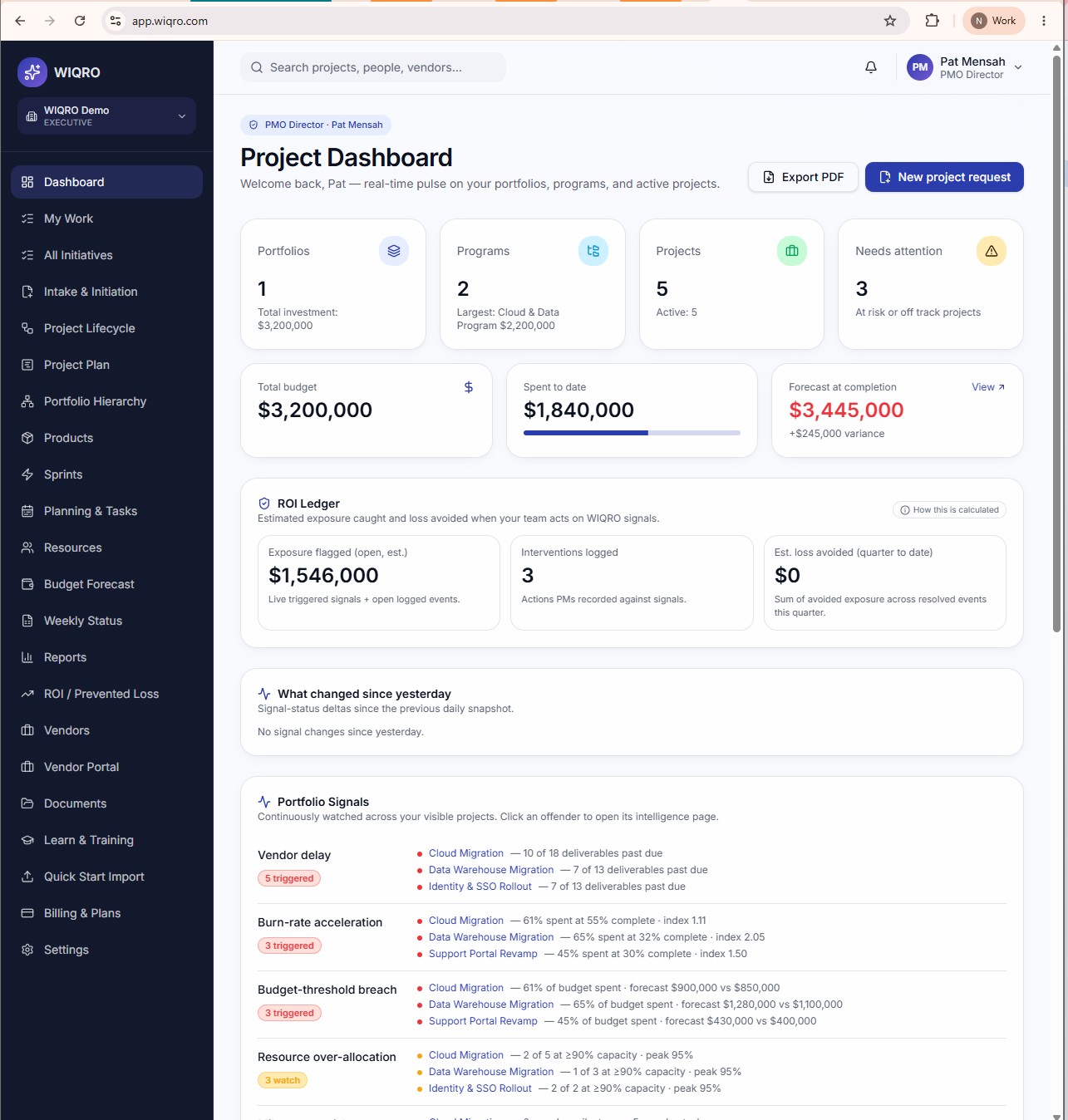
WIQRO's Portfolio Signals layer, detecting vendor delay, burn-rate acceleration, and budget-threshold breaches across a $3.2M portfolio — data from WIQRO's demo workspace.
How AI Closes the Gap Between Data and Register
The risk register remains the right tool for what it does: creating shared accountability, forcing response conversations, and maintaining a governance record of known risks. The question is not whether to use one — it is how to ensure that the risks developing in your project data actually reach it in time to act on.
This is what AI-powered project intelligence is designed to do. Instead of waiting for a team member to notice a signal and raise it, an intelligence layer monitors project data continuously and surfaces anomalies as they develop — flagging them before they require manual identification and documentation.
The workflow changes from:
Signal develops → someone notices → someone decides to log it → it gets added to the register → the team responds
To:
Signal develops → intelligence layer detects it → PM and PMO are alerted → the team responds (and adds it to the register with the alert as documentation)
The risk register doesn't disappear — it becomes more accurate, because it captures risks identified by continuous data monitoring, not just risks noticed at weekly meetings. The documentation gap shrinks from 7–14 days to hours.
Think of the risk register as a medical chart — it records conditions. Project intelligence is vital signs monitoring — it alerts the care team before a condition becomes critical. Both are necessary. Only one of them catches the problem early.
Risk Register Best Practices for PMOs
Based on the patterns we see in how PMOs manage risk across portfolios, these practices consistently make the difference between a register that is used and one that is maintained for governance but ignored in practice:
Separate risk identification from risk response. In many organizations, the person who identifies a risk and the person who owns the response are different. If identifying a risk feels like immediately being handed a problem to solve, people stop raising risks. Separate the identification meeting from the response planning conversation.
Score risks consistently. A risk scored 4 by one PM and 2 by another for the same underlying situation creates a useless register. Define what each score level means in concrete terms — for likelihood, what does "likely" mean in terms of probability? For impact, what budget or schedule effect qualifies as "high"? Document the scale and train PMs to apply it the same way.
Close risks explicitly. Risks that resolved without materializing are still worth closing explicitly. An open register full of risks that were never formally closed looks like an unmanaged risk environment. Closing a risk with a note on why it was resolved is also useful data for retrospectives and future similar projects.
Connect risks to milestones. A risk that has no relationship to a project milestone is hard to prioritize. Link each risk to the milestone or deliverable it threatens. This makes the register far more actionable — when a milestone is at risk, the team can immediately see the documented risks connected to it and the planned responses.
Build portfolio-level visibility. Individual project risk registers are necessary but not sufficient for PMO governance. Senior leaders need a portfolio view: which projects carry the highest aggregate risk, where are risks clustered by category, and which risks are shared across multiple projects. This typically requires either a dedicated portfolio risk report or a tool that aggregates across projects automatically.
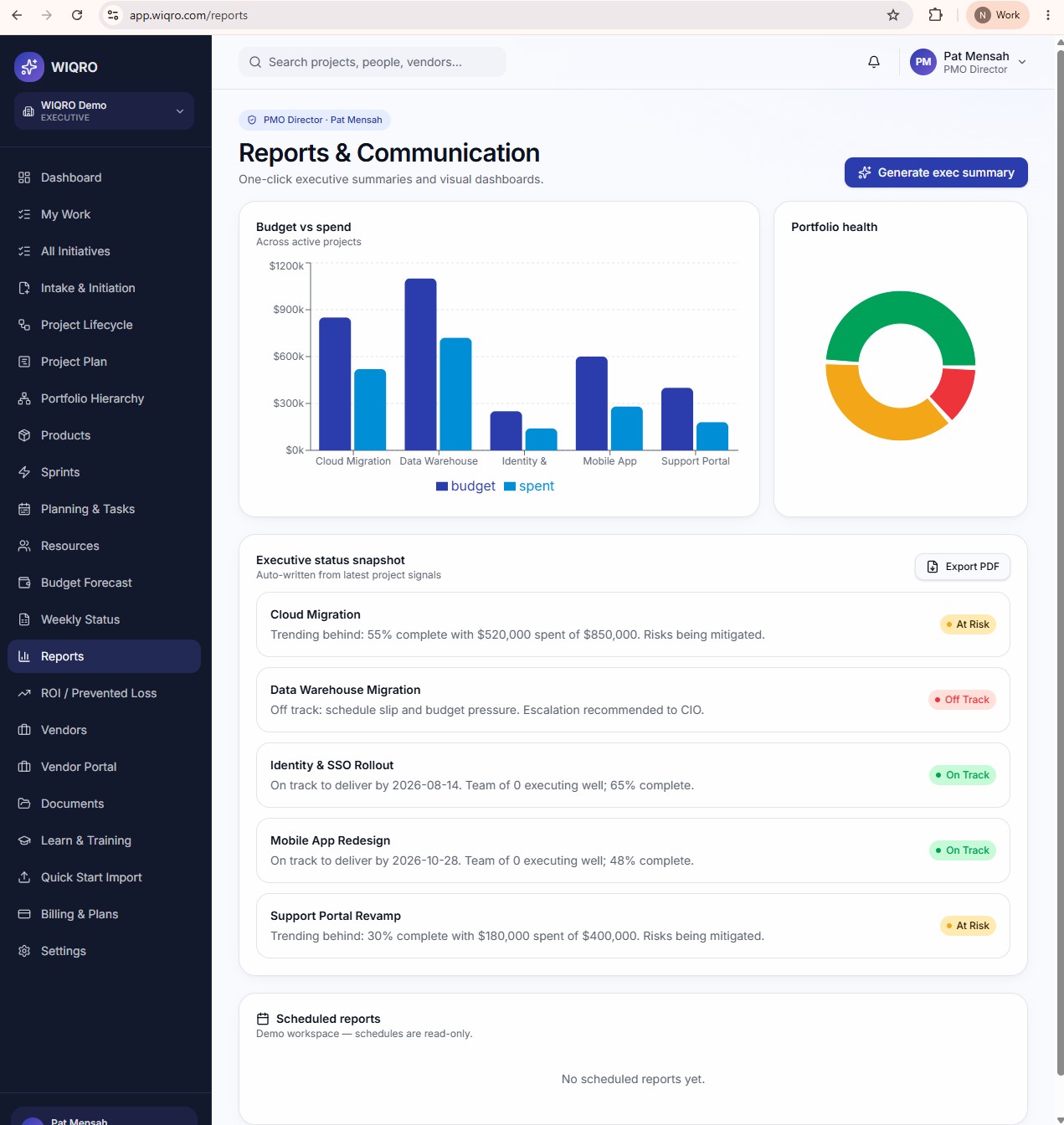
WIQRO's Reports view showing portfolio health and budget vs. spend across 5 active projects — demo workspace data.
Risk Register vs. RAID Log: What's the Difference?
PMOs in more complex governance environments often use a RAID log alongside or instead of a standalone risk register. RAID stands for Risks, Assumptions, Issues, and Dependencies. Understanding the distinction helps clarify when each is appropriate:
- Risk: A potential future event that may affect the project — uncertain, not yet happened. This is what the risk register tracks.
- Assumption: A condition treated as true for planning purposes without verified proof. If the assumption turns out to be wrong, it becomes a risk or issue.
- Issue: A risk that has already materialized — it is now a problem that needs to be resolved, not just monitored.
- Dependency: A relationship between projects, deliverables, or external parties that the project relies on. Dependencies often generate risks when the dependency is outside the team's control.
For most project teams, a well-maintained risk register is sufficient. RAID logs are more common in large government programs, infrastructure projects, and portfolio management offices that need to track all four dimensions systematically across many projects simultaneously.
Evaluating Risk Management Tools for PMOs
When evaluating tools to support risk register management and broader project risk intelligence, these are the questions that matter most at the PMO level:
- Can it scale across a portfolio, not just a single project? A PM-level risk tool is not the same as a PMO-level risk platform. You need portfolio aggregation, not just per-project tracking.
- Does it surface signals proactively, or only record risks you log manually? Manual registers capture known risks. AI-powered platforms can surface developing risks from project data before they're formally identified.
- Does it connect risk to schedule and budget data? A risk register that lives in a separate spreadsheet from your project plan creates an artificial separation. Risk should be visible in the context of the milestones and budgets it threatens.
- Can it generate executive-ready risk reports? PMO leaders need to communicate portfolio risk to CIOs, COOs, and boards. The tool should support clear, non-technical risk communication — not just a data dump.
- Does it support risk ownership and accountability tracking? Who owns each risk, whether they've taken action, and whether the response is working needs to be visible without manual follow-up.
Frequently Asked Questions
What is a project risk register?
A project risk register is a document that lists all identified risks for a project, along with their likelihood, potential impact, assigned owners, and planned responses. It is the primary tool teams use to track, communicate, and manage known project risks throughout the project lifecycle.
What should be included in a project risk register?
A complete project risk register includes: Risk ID, risk description, category (schedule, budget, resource, vendor, compliance), likelihood rating, impact rating, risk score (likelihood × impact), risk owner, response strategy (Accept, Mitigate, Transfer, Avoid), current status, trigger conditions, and review date. Some PMOs also include residual risk after the response is applied.
What is the difference between a risk register and a risk log?
In practice, "risk register" and "risk log" are used interchangeably by most project teams. Some organizations use "register" for a structured document with mitigation plans and owners, and "log" for a simpler tracking list. The PMBOK Guide uses "risk register" as the formal term.
How often should a risk register be updated?
Most PMO guidance recommends reviewing the risk register at weekly or bi-weekly status meetings. High-risk projects may warrant more frequent review. The key is consistency — an infrequently reviewed register becomes stale and is less likely to be used in practice. Continuous data monitoring tools can supplement the formal review cadence by surfacing signals between meetings.
What is the biggest weakness of a project risk register?
The biggest weakness is that a risk register only captures risks that someone has already identified and decided to document. Risks developing in project data — vendor lag trends, burn-rate accelerations, resource over-allocation patterns — are invisible to the register until a human notices them and logs them. This documentation gap typically runs 7–14 days in a standard weekly reporting cycle, which is the window where early intervention is most effective.
What tools are used to maintain a project risk register?
Teams maintain risk registers in Microsoft Excel or Google Sheets (most common for smaller PMOs), project management platforms like Microsoft Project, Smartsheet, Jira, Asana, or Monday.com, and dedicated risk management tools. AI-powered project intelligence platforms extend this by automatically detecting risk signals in project data and surfacing them before they need to be manually logged.
Related Resources
Demo data notice: Screenshots in this article show WIQRO's demo workspace (Pat Mensah, PMO Director — demo data only). All portfolio figures, project names, signals, and team member names are illustrative and do not represent real customers or actual results.